
Updated:
A California 3 day notice, also called a 3-day eviction notice, is a written demand that a landlord gives a tenant. It gives the tenant three days to pay overdue rent, or to fix a lease violation or give up the property. The three days do not count Saturdays, Sundays or other judicial holidays.[3] Use the free form below to create one and download it as a PDF.
Build Your Document
Answer a few simple questions to make your document in minutes
Save and Print
Save progress and finish on any device, download and print anytime
Sign and Use
Your valid, lawyer-approved document is ready
A pay or quit notice for unpaid rent is in writing and demands payment. It gives the tenant three days to pay the rent or quit the property. The three days do not count Saturdays, Sundays or other judicial holidays. It also states the amount due and the name, telephone number and address of the person who receives the rent.[3]
Three days' notice, excluding Saturdays and Sundays and other judicial holidays, in writing, requiring its payment, stating the amount that is due, the name, telephone number, and address of the person to whom the rent payment shall be made, and, if payment may be made personally, the usual days and hours that person will be available to receive the payment
In plain words, a notice for unpaid rent includes these items:
Our eviction notice template for unpaid rent has a place for each item.
A notice is not a lockout. California law does not let a landlord use self-help, such as changing the locks, to force a tenant out. See the answer under Frequently Asked Questions.[2]
| Document Name | California 3-Day Eviction Notice Form |
| Other Names | California 3-Day Notice to Pay or Quit, California 3-Day Notice to Vacate |
| Relevant Laws | Cal. Civ. Proc. Code § 1161 |
| Avg. Time to Fill Out | 10 minutes |
| # of Fillable Fields | 41 |
| Available Formats | Adobe PDF |
For the other eviction notices used in California, see our California eviction notice forms.


California
To: ____________________________________________________________________________________________,
(Name)
Tenant(s) in possession of the premises at _____________________________________________________________,
(Street address)
City of _________________________________________, County of __________________________ , California.
Please take notice that the rent on these premises occupied by you, in the amount of $ __________________, for rent due for the
following period from __________________________to ___________________________, is now due and payable.
YOU ARE HEREBY REQUIRED to pay this amount within THREE (3) DAYS from the date of service of this notice on you, or to vacate and surrender possession of the premises. Your failure to do so will result in legal proceedings being initiated against you to recover possession of the premises, declare the forfeiture of the rental agreement or lease under which you occupy the premises, and recover rents, damages, and costs of suit.
RENT IS TO BE PAID TO: the undersigned, or
the following person: ________________________________________________________________________
AT THE FOLLOWING ADDRESS: ___________________________________________________________________
_________________________________________, California, phone: _______________________________________
IN THE FOLLOWING MANNER:
In person. Usual days and hours for rent collection are: ____________________________________________
by mail to the person and address indicated above _________________________________________________
by deposit to account _________________________ at ______________________________, a financial institution located
within 5 miles of your rental, at ___________________________________, California
by electronic funds transfer procedure previously established.
Date: ____________________________ __________________________________________________________
(Owner/Manager)
State law permits former tenants to reclaim abandoned personal property left at the former address of the tenant, subject to certain conditions. You may or may not be able to reclaim property without incurring additional costs, depending on the cost of storing the property and the length of time before it is reclaimed. In general, these costs will be lower the sooner you contact your former landlord after being notified that the property belonging to you was left behind after you moved out.
Proof of Service
I __________________________________________________, the undersigned, being at least 18 years of age, served this notice, of
which this is a true copy, on _____________________________________, one of the occupants listed above as follows:
___ On __________________, _____, I delivered the notice to the occupant personally.
___ On __________________, _____, I delivered the notice to a person of suitable age and discretion at the occupant’s
residence/business after being attempted personal service at the occupant’s residence, and business, if known. On
__________________, _____, I mailed a second copy to the occupant at his or her own residence.
___ On __________________, _____, I posted the notice in a conspicuous place on the property, after having attempted personal
service at the occupant’s residence, and business, if known, and after having been unable to find there a person of suitable age and discretion. On __________________, _____, I mailed a second copy to the occupant at the property.
I declare under penalty of perjury under the laws of the State of California that the foregoing is true and correct.
Date: ____________________________ _______________________________________________
Signature
2013
California has two kinds of 3-day notice, and the one you use depends on the problem. A pay or quit notice is for unpaid rent. A perform or quit notice is for breaking a condition of the lease. Both give the tenant three days, not counting Saturdays, Sundays or other judicial holidays.[3]
A subtenant who actually lives in the unit has the same three days to pay the rent or perform the conditions.[3]
The FormsPal template for unpaid rent has four parts, and you fill them in from top to bottom. You can fill in the downloaded PDF with our PDF editor or answer the questions in the online builder above. Then print the notice and sign it.
The screenshots under each step show the FormsPal California 3-day eviction notice template filled with sample entries in blue, so you can see where each answer goes. The names, addresses, dates and amounts are examples only.
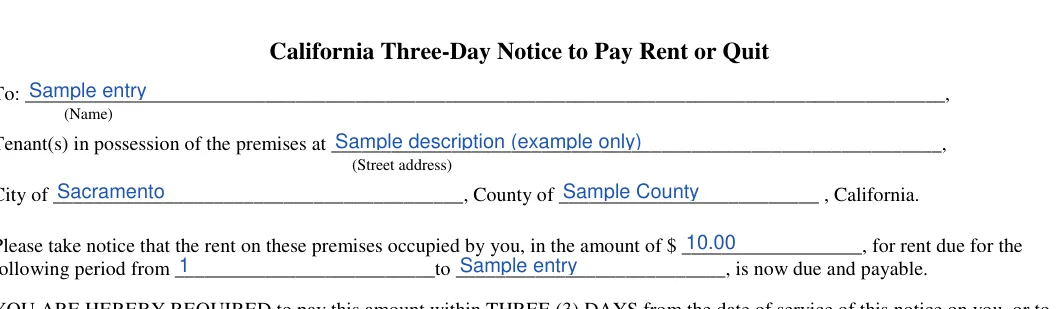

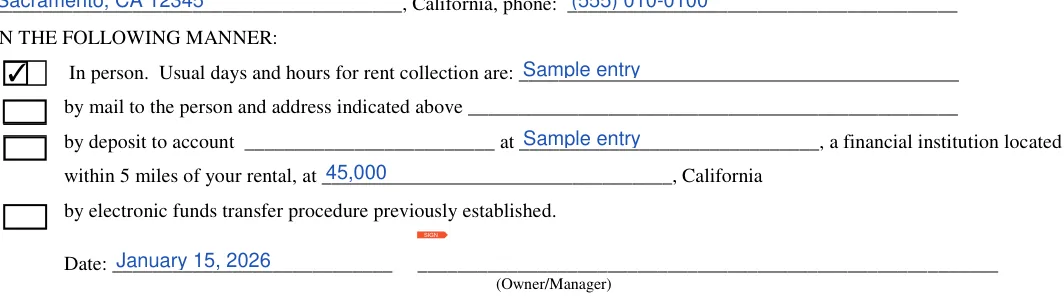
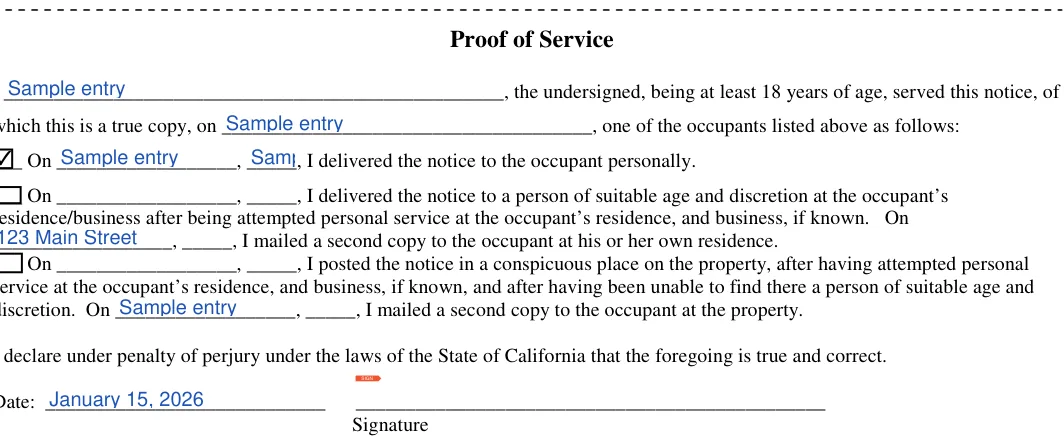
Serving the notice means delivering it to the tenant and, if one actually lives in the unit, to the subtenant.[3] The person who delivers it fills in the proof of service on the form, which records how the notice was delivered. The steps below cover who gets the notice, what to avoid, and how to count the three days.
In practice, some landlords agree to wait longer when a tenant needs time to collect the rent. That is up to the landlord.
Yes. After a tenant defaults in the payment of rent, a landlord can give a written notice that demands payment. It allows three days, not counting Saturdays, Sundays or other judicial holidays. The notice must state the amount due and the name, telephone number and address of the person to whom the rent is to be paid.[3]
No. A landlord may not use self-help to end a tenant's occupancy of a home.[2] Without the tenant's prior written consent, that includes any of these acts:
The one exception is the separate legal procedure for a tenant's abandoned property.
The notice may be served at any time within one year after the rent becomes due.[3]
A summons may be served by any person who is at least 18 years of age and not a party to the action.[1] The landlord is a party, so another adult who is not involved in the case would serve it.
General information, not legal or tax advice.

